Ever wanted to join a book club at your local library but not in the mood to leave the heater on these cold winter nights? Sounds like you need to check out Google+ Hangouts, the latest rage hitting your local library. Whether you wish to join an established community, check out an author talk, participate in an event on air as its happening or just chat to your mates about the latest Game of Thrones, this is definitely worth checking out. All you need is a Google+ account and Google Chrome browser. You can have your own private hangout with up to ten friends or create your own public event and talk to the world! Every public event is saved to your own You Tube channel. A great resource for libraries to bring together the community, for the house bound or book groups looking for a way to just hang out from..well, anywhere, anytime!
For more information on Google+ Hangouts, visit the website.
While you're there, make sure you check out the latest events scheduled on Hangouts On Air
Friday, July 19, 2013

Friday, May 3, 2013
Satisfy your curiosity with the new Curio app
THE NSW State Library has launched a new app
called “Curio” that gives users detailed information about exhibits as they
view them in the library.
The free app gives extra information on each exhibit and, for
some items, audio and video. It is able to pinpoint where the user is in the
library and provide relevant information about exhibits whilst they are viewing
them. To enhance the interactive
experience, users can also rate objects in the library whilst there and then
play back their visit to the library at home.
Users can also share their favourite objects on Facebook and Twitter.
The new “Curio” app is available for iOS and Android
devices but works most effectively with the iPhone 4S, iPhone 5 and the
ASUS-manufactured Google Nexus 7-inch tablet. The app uses a form of indoor
location technology that is accurate enough to give users information about
collections within the room they are visiting.
“The innovative mobile interface knows where you are inside the
State Library and intuitively delivers interesting facts, surprising stories
and multimedia about the objects and architectural features around you,” the
library said in statement.
Source: The Australian April 10, 2013
Wednesday, March 6, 2013
ShelvAR- The best thing since the DDC
Really, what was Dewey thinking? Was he just making sure that no library worker would ever be safe from the dreaded shelf check? So we never would have time to just sit around and read books all day? Yep, never a dull moment while those books continue to find themselves out of order while the Decimal system continues to confuse unsuspecting shelvers. Well, finally,Dewey's plans may just be foiled...
Recently, at a gathering in
To prepare the collection for use, the staff labelled the books with codes generated by the LC numbers, placed them in a straight line then simply scanned the labels with a smartphone camera.The ShelvAr app then ticks properly placed items and questions the misplaced. Tap the screen and an arrow points you in the correct direction. Check out the ShelvAr in action with exciting demonstrative videos at http://www.shelvar.com/
Monday, February 4, 2013
Making Popcorn!
An online tool to make more dynamic video clips
This online tool would appear to not only
have significant potential to make videos more dynamic, but is also great fun
to experiment with! Mozilla Popcorn Maker is an online tool that makes it possible
to combine video with content pulled directly from the web including everything
from text, links and maps to pictures and live feeds. The creators’ aim was to
take “video beyond the box” citing that the only change in videos after a
decade on the web has been the size of the box and the quality of the picture!
Popcorn Maker is free to use and claims to
work in all browsers (although my web browser apparently “lacks some
functionality expected by Popcorn Maker to function properly”!). Working with
timelines just as you do when editing video, web events are pulled into the
timeline as opposed to clips.
For example, you can include a live feed
from Flickr by dragging the Flickr option into the timeline and it will pull in
images off the web according to the selected tags. As it is a live feed, it will be different
every time you access the video. Other options to include on the timeline, and
therefore in the video clip, are Google Maps, Wikipedia, pop-ups, Twitter and
images.
In short, it means that videos created like
this can work just like the web; dynamic, full of links and completely
remixable. Definitely worth a look! To see some
examples of what can be done or to take a tutorial, go to the Popcorn Maker website.
Saturday, February 13, 2010
Foursquare
Foursquare seems to be the current hottest thing in social networking. It is a way of connecting with friends and participating in a game whilst exploring restaurants, parks, cafes, bars, museums etc... It can be used anywhere in the world and for mobile access you can either download an app or use their mobile-friendly website.
If you go out to a bar for example, you tell Foursquare where you are ("check-in"). To do this, it uses GPS to give you a listing of nearby places from which you select your location. It will then notify your friends of where you are.
 It doesn't stop there.... When you log into Foursquare you can add tips and to dos. These are all location- and experience-based comments. For example, recommend a particular dish at a restaurant or a must see exhibition. Tips are recommendations for others, to dos are reminders to yourself to try a new dish/place etc... Thus when you check-in with Foursquare it will come up with tips from your friends and to dos from you relating to your current location.
The 'game' component comes from a points system used to encourage you to go out and explore. You receive points for each check-in. Bonus points are on offer for those who are the first to register a new place. You can even become Mayor by being the person to have visited a particular location the highest number of times.
Foursquare integrates with other web 2.0 tools. If you choose to you can link your Foursquare account to your Twitter and Facebook accounts and allow it to report updates. Foursquare itself keeps stats on you - they track your activity - number of nights out, number of checkins, ave. no of checkins per night out, distribution by day etc...
Foursquare seems to have found its niche by creating partnerships with businesses that produce shopping and restaurant guides. This gives them a way of creating a money-making aspect to their resource. There is an interesting article about this on TechCrunch.
Yelp is another social networking site that enables sharing of reviews for local businesses, restaurants, shops and the like, but it appears to focus more strongly on the review aspect than does Foursquare. Yelp also has not been around as long as Foursquare and although it seems good it has a more limited geographic representation.
If you go out to a bar for example, you tell Foursquare where you are ("check-in"). To do this, it uses GPS to give you a listing of nearby places from which you select your location. It will then notify your friends of where you are.
 It doesn't stop there.... When you log into Foursquare you can add tips and to dos. These are all location- and experience-based comments. For example, recommend a particular dish at a restaurant or a must see exhibition. Tips are recommendations for others, to dos are reminders to yourself to try a new dish/place etc... Thus when you check-in with Foursquare it will come up with tips from your friends and to dos from you relating to your current location.
The 'game' component comes from a points system used to encourage you to go out and explore. You receive points for each check-in. Bonus points are on offer for those who are the first to register a new place. You can even become Mayor by being the person to have visited a particular location the highest number of times.
Foursquare integrates with other web 2.0 tools. If you choose to you can link your Foursquare account to your Twitter and Facebook accounts and allow it to report updates. Foursquare itself keeps stats on you - they track your activity - number of nights out, number of checkins, ave. no of checkins per night out, distribution by day etc...
Foursquare seems to have found its niche by creating partnerships with businesses that produce shopping and restaurant guides. This gives them a way of creating a money-making aspect to their resource. There is an interesting article about this on TechCrunch.
Yelp is another social networking site that enables sharing of reviews for local businesses, restaurants, shops and the like, but it appears to focus more strongly on the review aspect than does Foursquare. Yelp also has not been around as long as Foursquare and although it seems good it has a more limited geographic representation.
Monday, February 8, 2010
VALA and ebooks
Technology peeps ahoy,
The VALA 2010 conference is underway in Melbourne as I write.
Kathryn Greenhill, librarian 2.0 virtuoso is tweeting live from proceedings.
You can check her out here...
http://twitter.com/libsmatter
Also yesterday's Sunday Profile on Radio National was all about ebooks. Stephen Page of Faber and Faber is interviewed. As this happens to be the very subject we plan to explore with the public in just a few short weeks, I think we should check it out.
Download the podcast here...
http://www.abc.net.au/sundayprofile/stories/2811148.htm?site=greatsouthern
TTFN
The VALA 2010 conference is underway in Melbourne as I write.
Kathryn Greenhill, librarian 2.0 virtuoso is tweeting live from proceedings.
You can check her out here...
http://twitter.com/libsmatter
Also yesterday's Sunday Profile on Radio National was all about ebooks. Stephen Page of Faber and Faber is interviewed. As this happens to be the very subject we plan to explore with the public in just a few short weeks, I think we should check it out.
Download the podcast here...
http://www.abc.net.au/sundayprofile/stories/2811148.htm?site=greatsouthern
TTFN
QR Codes - assistance on the go
QR codes are graphic codes that can be read using the camera on many existing mobile phones with the appropriate app. There are a number of websites such as http://qrcode.kaywa.com/

that allow you to create your own QR code which can then be printed or embeded into a website. These codes can be used to convey text such as brief details of an event such as a seminar.

When used on a web-enabled phone, they can also direct you to a website for further information. QR codes are appearing in many magazines for this very purpose.
UTS Library is running a pilot project using a range of applications of QR codes. For example, they are including the codes on their promotional bookmarks and brochures to link clients to the relevant online content. They are also placing the codes on equipment used by customers in the library. If the customer is unsure how to use the equipment they can scan the code and watch a short demonstration video. This is a great way of supplementing existing assistance by providing a physical demonstration.
that allow you to create your own QR code which can then be printed or embeded into a website. These codes can be used to convey text such as brief details of an event such as a seminar.
When used on a web-enabled phone, they can also direct you to a website for further information. QR codes are appearing in many magazines for this very purpose.
UTS Library is running a pilot project using a range of applications of QR codes. For example, they are including the codes on their promotional bookmarks and brochures to link clients to the relevant online content. They are also placing the codes on equipment used by customers in the library. If the customer is unsure how to use the equipment they can scan the code and watch a short demonstration video. This is a great way of supplementing existing assistance by providing a physical demonstration.
Thursday, February 4, 2010
iPad

Apple have finally released the iPad after so much hype, rumour and guess work. Although not available for purchase as yet it has caused a lot of people to tweet, blog, comment and many articles written about it already. Some of these comments have been positive while others scathing for a piece of technology they still haven't touched yet.
Architectures have even already started to design ideas on how the ipad can be used in libraries.
From these articles, blog posts and tweets people can definately start making decisions on whether this new piece of technolgy works for you.
The major points that I can find that will help make your decision are:-
- iBook app at time of release will not be available in Australia. Even when it is, given the Australian laws limiting what e-books can be purchased, we will be limited, as with iTunes, on the content we can purchase.
- Will iPad will be the death of the Kindle? If the Kindle does not continue to develop it is predicted that the iPad will become the piece of technology that will replace the e-book readers.
- Apple have made the decision to use epub as the e-book format. Maybe with Apple adopting this format this will urge publishers to finally make a decision on what the format for all e-books will be.
- The cost is reasonable from the cheapest to the most expensive. Will the 3G version work in Australia? Only time will tell.
- No allowance has been made for extra memory that could cause problems.
- No handwriting recognition. What about making notes on e-books is it possible? Why didn't they think of this as an option?
- The name - who thought the ipad was a good option? Must have come from a man!
Saturday, October 17, 2009
Stream me up Scotty!
Well it really should be no surprise to some that I'm a bit of a Trekkie, being dedicated enough even to order copies of a series at my local video outlet on VHS, that's how much I was obsessed. but then I became a librarian, and my Trekkie desires somewhat abated.
But this article I recently peruesd over on Agnostic, Maybe made me realise that elements of Star Trek are indeed creeping back into my life. With the increasing mobility of access to information, it is only the freedom of access that is keeping us from coming even closer to the way those space faring corsairs had information at their fingertips.
Now considering the fact that the Star Trek world had almost all information accessible anywhere anytime, where does this leave the path of the humble library building? People will have grown up interfacing with the Trekkie information receptacles, so there is no need for the everyday reference interview. So does this mean I should be looking forward to being out of a job?
But this article I recently peruesd over on Agnostic, Maybe made me realise that elements of Star Trek are indeed creeping back into my life. With the increasing mobility of access to information, it is only the freedom of access that is keeping us from coming even closer to the way those space faring corsairs had information at their fingertips.
Now considering the fact that the Star Trek world had almost all information accessible anywhere anytime, where does this leave the path of the humble library building? People will have grown up interfacing with the Trekkie information receptacles, so there is no need for the everyday reference interview. So does this mean I should be looking forward to being out of a job?
Saturday, October 3, 2009
Re-thinking about being a twit...
So having been using facebook for a few months now as a birthday present to myself, I've been trying to wrap my head around using social networking sites to the advantage of the library. This really came to the fore of my mind when we had a combined issue with our computers and phone system. I thought to myself 'hey, this would be a great time to tell our visitors about what's going on via twitter!', which has of course made me rethink about its uses as a communication medium. it could be used to remind patrons of events, provide quick reference pointers, even renew items. Whilst browsing through some blogs I follow there was a good one on some tools to enhance the twitter experience. The tools it mentions would go a long way in making twitter an effective and manageable tool in the library world;
bit.ly
Tweetdeck
Friendfeed
Twitter Search
Twitter Sheep
So if you are already using twitter, check them out and see what you think.
bit.ly
Tweetdeck
Friendfeed
Twitter Search
Twitter Sheep
So if you are already using twitter, check them out and see what you think.
Saturday, September 12, 2009
One Library to rule them all
So with the increasing digitisation of books, one does have to ponder the belief that will there one day be a singular address that can provide materials to everyone? Project Gutenberg and many others have tried to achieve this in the form of free digitisation, but with advent of online ebook vendors becoming more prevalent, a recent article champions google books as putting up its bid to bring the end of the library age as we know it. But how successful will this be?
Current trends of the now generation may be in their favour, but what will the end result be? The article somewhat takes the narrow view that books are simply a hoarding place for paper knowledge, but it disregards that most are moving toward a gathering place to access information, not just within its walls but online as well. What do you think?
Current trends of the now generation may be in their favour, but what will the end result be? The article somewhat takes the narrow view that books are simply a hoarding place for paper knowledge, but it disregards that most are moving toward a gathering place to access information, not just within its walls but online as well. What do you think?
Tuesday, August 18, 2009
Imagine the image of your images.
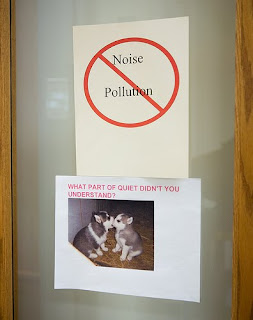 Confused? well given the advent of increasing levels of technology being adapted for use in the library, not all are so egalitarian when it comes to accomodating it. This even extends to the view that time honored librarian 'shush' being spurned as libraries become a place for social gathering; a cultural hub if you will. But not all would agree with this sentiment as the signage indicates. I can even remember the formative years of my youth being chided 'no dinner in front of the tv', would it now be 'no twittering at the table'?
So take a look at these pictures and have a think about how technology has impacted on the projected or percieved image of a library you know.

The Librarian’s Touch!, originally uploaded by vanhookc.
Tuesday, June 23, 2009
Libraries under threat
Libraries in America are under threat from the Global Financial Crisis. Funding is being cut, opening hours being cut and staff losing jobs . In a climate where statistics are proving that customers are using Libraries more and more how can government justify the closing of such an important service to the community.
The latest library fighting the cut of funding is Ohio Public Libraries, the staff are fighting back having a plan and using technology to reach as many of their customers as possible. They have a plan and are trying to stop the reduction of services throughout the state. Helene Blowers latest blog post and following information on Twitter #saveohiolibraries are using the technology available to their advantage.
Ray Bradbury has joined the cause to save Public Libraries, surely with a well known author mounting the fight maybe if more authors got on side then the government would see that we are an important institution that customers need and not something that they can just slash in their budgets when times get tough.
We will be watching what happens in Ohio with great interest and with all Public Libraries in the US.
The latest library fighting the cut of funding is Ohio Public Libraries, the staff are fighting back having a plan and using technology to reach as many of their customers as possible. They have a plan and are trying to stop the reduction of services throughout the state. Helene Blowers latest blog post and following information on Twitter #saveohiolibraries are using the technology available to their advantage.
Ray Bradbury has joined the cause to save Public Libraries, surely with a well known author mounting the fight maybe if more authors got on side then the government would see that we are an important institution that customers need and not something that they can just slash in their budgets when times get tough.
We will be watching what happens in Ohio with great interest and with all Public Libraries in the US.
Saturday, June 20, 2009
how does the other see it.
So it seems social networking is creeping its way into the psyche of many organisations as a legitimate means of communicating information in a fast and formal/informal manner. As I was doing a bit of catchup on my 'professional reading' following a meeting with my fellow technovisionaries, I came across an interesting post in regards to blocks to social networking. You can find the blog post here on Michael Stephen's blog.
The crux of it is a public department using a social networking too, in this case twitter to promote an event in the community, but having social networking blocked on its own public computers. Think if the library in question was hosting an event and people wanted to comment on it whilst at the library, with participants asked to comment on their website/feed?
This is yet another example that highlights the control many public libraries face: being under the jurisdiction of another governing body. It means any communication that goes out for instance from a public library feed needs to meet the governing body's standards. Its still a very murky area, but we'll have to see how it will pan out.
The crux of it is a public department using a social networking too, in this case twitter to promote an event in the community, but having social networking blocked on its own public computers. Think if the library in question was hosting an event and people wanted to comment on it whilst at the library, with participants asked to comment on their website/feed?
This is yet another example that highlights the control many public libraries face: being under the jurisdiction of another governing body. It means any communication that goes out for instance from a public library feed needs to meet the governing body's standards. Its still a very murky area, but we'll have to see how it will pan out.
Friday, June 5, 2009
Going up?
Well, a month or so has passed since my last attempts to enlighten and enliven peoples knowledge through my musings and enthusings. So much it seems that our much lauded 2.0 has become a 3.0. as mentioned in by Kara Swisher and Walt Mossberg. But where are my patch updates dare I say? are we ready for such things? Some say nay to this increment of integers such as a Mr Scobleizer, in his piece on why this is wrong.
So what do you all think? the simple advent of computers and the Internet has seen many libraries struggle to meet the ever flowing development in not only hardware and software that the technology savvy socialites utilise everyday. you could almost compare library service eras to that of the Internet to see how the two compare. It would be interesting to see how well we as information professionals stack up against the ever changing tidal waves of Internet movements.
So what do you all think? the simple advent of computers and the Internet has seen many libraries struggle to meet the ever flowing development in not only hardware and software that the technology savvy socialites utilise everyday. you could almost compare library service eras to that of the Internet to see how the two compare. It would be interesting to see how well we as information professionals stack up against the ever changing tidal waves of Internet movements.
Monday, May 4, 2009
Flat Panel ideas
John Blyberg from Darien Library sent a Tweet on Saturday afternoon. A simple message that of course pipped my curiosity. Darien Library are using a Flat panel in the library to advertise what items are being returned. Customers have the ability to see what is being returned and if there items have been returned. It is a great tool for customers and staff alike.
It could be used for many different things. It could be adapted and used for items that are going out on loan as well. Items that are being reserved and for searches that are on the OPAC. Items being ordered and received into the Library.
This idea could be adapted for whatever you choose. Any ideas on how best to serve the customers?
Friday, April 17, 2009
Do You Compute?
Yes, computers certainly have made their mark, and taken up some space in our ever popular libraries across the world. But having technology in the library to satisfy public need should not be the only goal of providing them to the public; we should be thinking ahead of how we are offering the service. Sounds like something to discuss at a conference eh?
Well it has been! and whilst I was a continent away and unable to arrange transport, sufficient funds, leave etc. some lucky people, such as the esteemed David Lee King were able to attend CIL2009 and take some lovely notes for us distance challenged types. Hell most of my favourite bloggers were there!
Reading his notes it's great to see librarians thinking about the future of how we can adapt technology to our current services, rethinking and retooling the role of libraries and the librarian. One post of interest was on training which I have found invaluable in crafting ideas for the new courses my own library will implement in the future. The most important thing I pulled from this was this:
Don’t put the cart before the horse - there are some things you have to figure out first:
- Determine what the need is first - what do they need to learn/to improve their jobs, etc
- Then determine who the audience is.
It also mentioned some great new tools, Talkshoe and WebJunction, and of course Twitter.
Of course, my favourite was the John Blyberg headed a presentation on Innovation Services & Practices at the Darien Library. It completely blows apart the way traditional library services are being offered by meeting users at their points of need, rather that simply persevering with a service that is old and clunky. Its really amazing to read the direction that they are going in; Open source, roaming(!!!) one-on-one reference, and Instant Messaging through Meebo (though they are moving to LibraryH3lp).
It is conferences like this that really give us time to think about what it is we are offering to the public. Rather than setting up a service they may be able to use and be interested in, why not spend the time finding out what your community would like to see, investing in their interests, adapting to their usage patterns. Most importantly Libraries should not being afraid to try new things, to emphasise a culture of change. So if your operating under an Imperial Death Star structure, blow it it Rogue Librarian Squardron Style!
Wednesday, April 15, 2009
Diigo
Diigo provides an easy way of sharing relevant web content with friends, colleagues and collaborators. Once signed up, you can highlight a passage of interest within a webpage and even add a sticky note with comments. You're able to then bookmark the page so you can return and read more later or share it with others via, for example, email or blog. It seems like a very useful tool for collaborators to use to communicate between meetings. It presents a way of bringing information together in a way that isn't onerous and doesn't require reinterpretation of the content for it to be shared. By creating a group, when a member finds something of interest it can easily be distributed to other group members. Groups can be made public or private allowing you to control who you are communicating with. It makes it easier to pool resources, recommend reading to others and reduce the need for duplication of searches.
Thursday, April 2, 2009
Michael Stephens

With the announcement that Dr Michael Stephens, from the blog Tame the web, will be working with Townsville Libraries' Warren Cheetham to 'Measure the value and effect of Learning 2.0 programs in Australia'.
It is exciting news from that the first study of how effective Learning 2.0 programs are is being studied here in Australia.
I will be looking forward seeing what the studies findings are. With the Library having had the highest participation and completion of staff in the program in the state of NSW and the implementation of a committee to investigate and implement new and emerging web 2.0 technologies. It will be good to see how we as a library service have effectively used the training.
Friday, March 13, 2009
Have you hugged a luddite today?
With all the new fangle dangle tech tools that are amusing and bemusing the denziens of the globe, its a fair thing to say that not all are happy to embrace the race to a digitally delightful utopia. I see it within my family, my friends, at work, even on the streets in the eyes of children. and it seems I'm not alone in my observations, as guest author on Tame the Web Blog Mick Jacobsen elaborates upon in his post "love thy Luddite"
I'm sure that whilst some of us are extremly enthusiastic to join the emerging technology typhoon that never seems to be ending, others seem content to see the weather out, rather than get swept away. So maybe we should think about why they are ducking for cover everytime a new tecnological tool comes to the fore. I myself have noticed such tendancies when confronted with technology that has the potential to radically alter the way in which I see myself interacting with the world. So next time someone balks at your offer to show them a new technology they could use to enhance their lives, rather refute such a view, try to understand why it does not compute with them.
I'm sure that whilst some of us are extremly enthusiastic to join the emerging technology typhoon that never seems to be ending, others seem content to see the weather out, rather than get swept away. So maybe we should think about why they are ducking for cover everytime a new tecnological tool comes to the fore. I myself have noticed such tendancies when confronted with technology that has the potential to radically alter the way in which I see myself interacting with the world. So next time someone balks at your offer to show them a new technology they could use to enhance their lives, rather refute such a view, try to understand why it does not compute with them.
Subscribe to:
Posts (Atom)

 Posts
Posts

